- 1月 22 週五 202112:29
[Power BI] Power BI報告中的超連結設定

- 1月 22 週五 202111:11
[Power BI] Power BI新手地圖
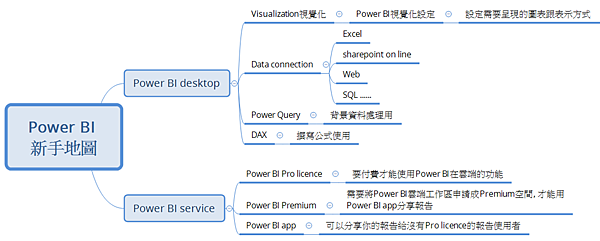
因為這篇文章(Power BI 101)的一些基本介紹都是寫英文的, 所以有些網友有需求要中文的, 所以才有產生了這篇文章.
但其實中文的有很多文章都有寫介紹也蠻詳細的, 我不想贅述, 所以用心智圖整理一下Power BI新手地圖在下面讓大家參考.
- 1月 21 週四 202121:12
[學習] Likecoin讚賞公民設定

開始學習自媒體後, 開始找些網路上相關的學習資源, 剛好看到Likecoin很棒的理念, 所以也申請了Liker land, 並將其設定在痞客邦.發現文章慢慢有人按讚了,還蠻開心的。
也隨手將找的資料及我的liker land資料附上. 有需要的話, 歡迎互相交流喔!
- 1月 17 週日 202121:54
[東森] 東森實習店主好康報報

《好康報報》
身為東森購物的消費者,花你本來要花的錢,免費送你500東森幣可以折抵,先省錢,再送你PV回饋,可以領現金回饋喔!
- 1月 16 週六 202116:42
[學習]自媒體之路-参考資源
最近開始上網路宅薪術,順便把跟自媒體經營相關的参考資源放上,這是一條漫長的路,希望能有志同道合的夥伴一起交流跟分享。
相關部落格文章
相關部落格文章
- 1月 15 週五 202111:53
電子書的世界
因為我有使用電子閱讀器的習慣, 所以朋友問我 "時下買的電子書必須在電子書閱讀器才能打開嗎 ? 還是pdf format ?"
想說還是有些人不太了解電子書, 所以還是解釋一下.
- 1月 13 週三 202109:38
[數據分析] Power Query and M language

- 1月 12 週二 202119:00
[Power BI] Power BI 101
剛好有個網友要之前上課的資料,我順便也要做教材給國外同事,所以先簡單整理起來。但比較抱歉的是,因為要給國外看,主要內容大多是英文的,有人需要看中文的,歡迎留言跟我說嚕!
歡迎大家回饋起步有哪些資源可以運用,我再整合到這,這樣就可以幫助初學者了。
針對中文的初學者, 我找到微軟很棒的資源, 請參考開始建置 Power BI
Power BI is a business analytics solution that lets you
−visualize your data
−share insights across your organization/ embed them in your app or website
−Connect to hundreds of data sources and bring your data to life with live dashboards and reports.
Power BI products - Power BI desktop
•Connect to hundreds of data sources on premises and in the cloud.
•Prepare and model your data with ease.
•Provide advanced analytics with the familiarity of Excel
•Create interactive reports customized for your business.
•Author for everyone, anywhere
Download and install Microsoft Power BI Desktop from the website or use Microsoft store to install it.
Microsoft store is a better solution due to the power BI software will be refreshed automatically once power BI desktop has new version released.
Power BI service
•Connect to hundreds of data sources, and visualize all your data with live dashboards and reports.
Then share insights across your organization to fuel intelligent action.
•Govern securely
•If you need to share the report with a group, need to ask Power BI Pro license from your company IT or buy the license via Microsoft.
•Access Power BI via office 365
−Need to use office365 account to login.
−If you are first time to use it, you need to register your account for Power BI.
Power BI Premium
•Power BI Premium gives you more consistent performance, support for large data
volumes, and the flexibility of a unified self-service and enterprise BI platform for
everyone in your organization.
− Need to apply it to setup the sharing workspace as Power BI Premium.
− Put the shared reports in Power BI Premium workspace and then distrube it via power BI app to share with others.
- After applying Power BI Premium workspace successfully, the diamond icon will be displayed for the workspace.
Data connection – Power BI data sources/ Connect to data in Power BI - documentation/ Create a report on a SharePoint List
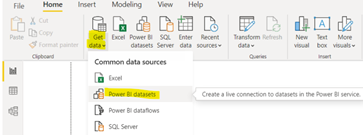
•Get the data from Power BI datasets
−Datasets are under the workspace which belong to Power BI Premium.
Power BI data field/ format/ Analytics
•Field: which data would like to display in charts/ tables
•Format: chart/ table format setting
•Analytics: only available for some charts
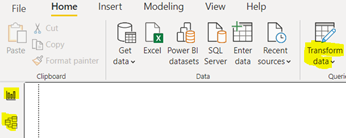
Power BI data – Query overview
•Change data type
•Data disposition
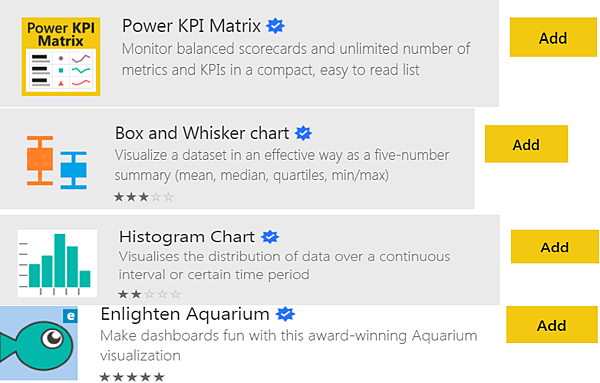
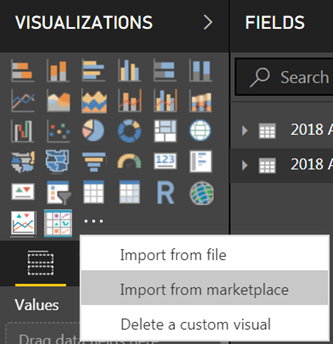
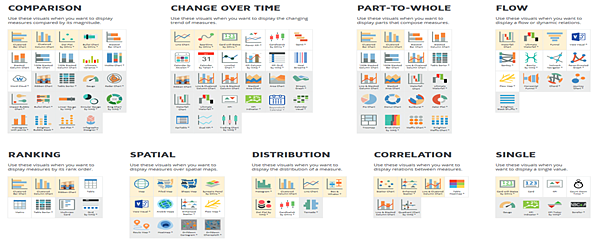
Power BI visuals (Visualization – import from market)
•Visualization tables/ charts
 |  |
 | |
Share Power BI report
(need to publish to power BI workspace with Power BI Pro license)
•Publish the report to Pro Power BI at office 365 workspace.
−Only authorized workspace can be selected.
−Only publish to Power BI premium workspace can share to authorized people to read it.
•Click hyperlink to quickly access the report at Pro Power BI.
Share Power BI report – App
•Select which dashboard/ reports will be shared at App.
−Only Power BI premium workspace can use App to share.
Share Power BI report – authorized control for App
•Only authorized people can read the shared reports via App.
Schedule Power BI report auto refreshing time
•Use setting to set report auto refreshing time.
[News]
"Today we’re announcing that for the 14th consecutive year1 Microsoft has been positioned as a Leader in the 2021 Gartner Magic Quadrant for Analytics and Business Intelligence Platforms. For the third year, Microsoft is positioned furthest to the right for completeness of vision and furthest up in the ability to execute within the Leaders’ quadrant."
Source: Gartner (February 2020)
Top 10 reasons customers tell us why they chose Power BI
Power BI的入門影片- It’s ALL About Relationship!!!
https://www.youtube.com/watch?v=qFYG2KKykCs
Power BI 官方教學文件
Dashboard in a Day - Power BI - Microsoft
Power BI 工程小組會每月更新所有 Dashboard in a Day 研討會的資產 (簡報者素材、示範用指令碼、學員逐步實作教室與資料集,外加如何順利進行活動的影片),並 免費提供給所有 Microsoft 合作夥伴網路的合作夥伴。下載講師內容,包含簡報者素材、示範用指令碼,以及講師訓練素材。 需要將您的 Microsoft 帳戶綁定您的 Microsoft 合作夥伴網路識別碼,才可存取此內容。 英文 , 其他語言
- 1月 12 週二 202108:51
Power BI-資料列層級安全性 (RLS: role level security)
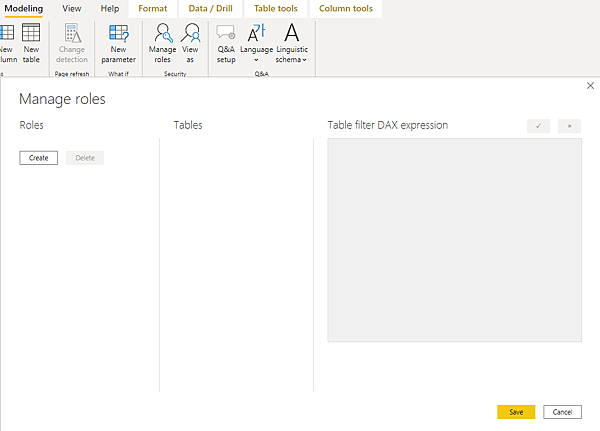
Power BI role level security Power BI 的資料列層級安全性 (RLS): 可用以限制指定使用者的資料存取。 篩選會限制資料列層級的資料存取,您可以在角色中定義篩選。
Microsoft Docs中其實已經說明的蠻清楚了, 但說明中是中文介面, 我的介面是英文版, 就順便截下來讓跟我一樣是英文介面的人參考

 好物分享 (1)